Unnamed repository; edit this file 'description' to name the repository.
Diffstat (limited to 'book/src/usage.md')
| -rw-r--r-- | book/src/usage.md | 78 |
1 files changed, 59 insertions, 19 deletions
diff --git a/book/src/usage.md b/book/src/usage.md index b0d77613..d31e03a1 100644 --- a/book/src/usage.md +++ b/book/src/usage.md @@ -1,33 +1,73 @@ -# Using Helix +# Usage -For a full interactive introduction to Helix, refer to the -[tutor](https://github.com/helix-editor/helix/blob/master/runtime/tutor) which -can be accessed via the command `hx --tutor` or `:tutor`. +(Currently not fully documented, see the [keymappings](./keymap.md) list for more.) -> 💡 Currently, not all functionality is fully documented, please refer to the -> [key mappings](./keymap.md) list. +See [tutor.txt](https://github.com/helix-editor/helix/blob/master/runtime/tutor.txt) for a vimtutor-like introduction. -## Modes +## Registers -Helix is a modal editor, meaning it has different modes for different tasks. The main modes are: +Vim-like registers can be used to yank and store text to be pasted later. Usage is similar, with `"` being used to select a register: -* [Normal mode](./keymap.md#normal-mode): For navigation and editing commands. This is the default mode. -* [Insert mode](./keymap.md#insert-mode): For typing text directly into the document. Access by typing `i` in normal mode. -* [Select/extend mode](./keymap.md#select--extend-mode): For making selections and performing operations on them. Access by typing `v` in normal mode. +- `"ay` - Yank the current selection to register `a`. +- `"op` - Paste the text in register `o` after the selection. -## Buffers +If there is a selected register before invoking a change or delete command, the selection will be stored in the register and the action will be carried out: -Buffers are in-memory representations of files. You can have multiple buffers open at once. Use [pickers](./pickers.md) or commands like `:buffer-next` and `:buffer-previous` to open buffers or switch between them. +- `"hc` - Store the selection in register `h` and then change it (delete and enter insert mode). +- `"md` - Store the selection in register `m` and delete it. -## Selection-first editing +### Special Registers -Inspired by [Kakoune](http://kakoune.org/), Helix follows the `selection → action` model. This means that whatever you are going to act on (a word, a paragraph, a line, etc.) is selected first and the action itself (delete, change, yank, etc.) comes second. A cursor is simply a single width selection. +| Register character | Contains | +| --- | --- | +| `/` | Last search | +| `:` | Last executed command | +| `"` | Last yanked text | -## Multiple selections +> There is no special register for copying to system clipboard, instead special commands and keybindings are provided. See the [keymap](keymap.md#space-mode) for the specifics. -Also inspired by Kakoune, multiple selections are a core mode of interaction in Helix. For example, the standard way of replacing multiple instances of a word is to first select all instances (so there is one selection per instance) and then use the change action (`c`) to edit them all at the same time. +## Surround -## Motions +Functionality similar to [vim-surround](https://github.com/tpope/vim-surround) is built into +helix. The keymappings have been inspired from [vim-sandwich](https://github.com/machakann/vim-sandwich): -Motions are commands that move the cursor or modify selections. They're used for navigation and text manipulation. Examples include `w` to move to the next word, or `f` to find a character. See the [Movement](./keymap.md#movement) section of the keymap for more motions. +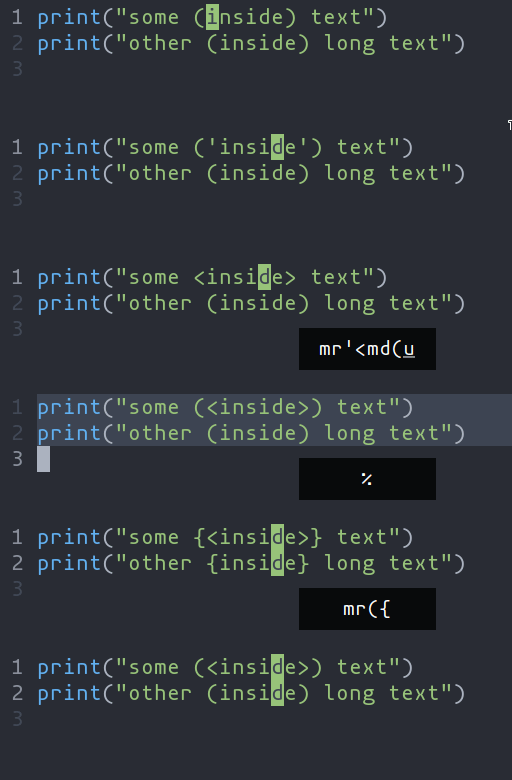 +- `ms` - Add surround characters +- `mr` - Replace surround characters +- `md` - Delete surround characters + +`ms` acts on a selection, so select the text first and use `ms<char>`. `mr` and `md` work +on the closest pairs found and selections are not required; use counts to act in outer pairs. + +It can also act on multiple seletions (yay!). For example, to change every occurance of `(use)` to `[use]`: + +- `%` to select the whole file +- `s` to split the selections on a search term +- Input `use` and hit Enter +- `mr([` to replace the parens with square brackets + +Multiple characters are currently not supported, but planned. + +## Textobjects + +Currently supported: `word`, `surround`, `function`, `class`, `parameter`. + + +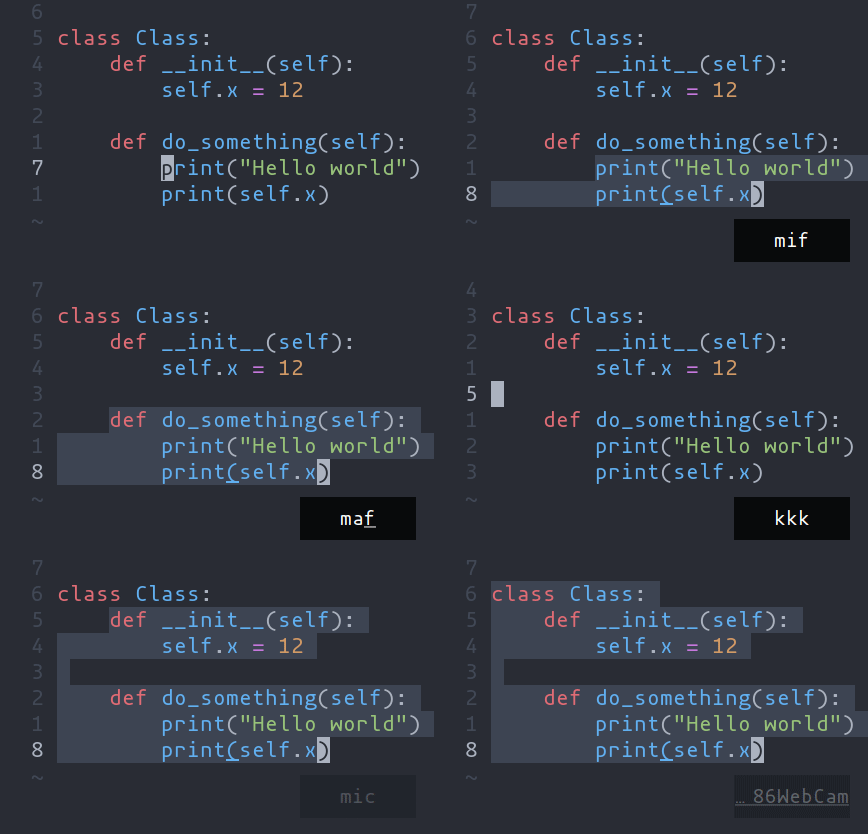 + +- `ma` - Select around the object (`va` in vim, `<alt-a>` in kakoune) +- `mi` - Select inside the object (`vi` in vim, `<alt-i>` in kakoune) + +| Key after `mi` or `ma` | Textobject selected | +| --- | --- | +| `w` | Word | +| `(`, `[`, `'`, etc | Specified surround pairs | +| `f` | Function | +| `c` | Class | +| `p` | Parameter | + +Note: `f`, `c`, etc need a tree-sitter grammar active for the current +document and a special tree-sitter query file to work properly. [Only +some grammars](https://github.com/search?q=repo%3Ahelix-editor%2Fhelix+filename%3Atextobjects.scm&type=Code&ref=advsearch&l=&l=) +currently have the query file implemented. Contributions are welcome ! |