## Selecting and manipulating text with textobjects
In Helix, textobjects are a way to select, manipulate and operate on a piece of
text in a structured way. They allow you to refer to blocks of text based on
their structure or purpose, such as a word, sentence, paragraph, or even a
function or block of code.

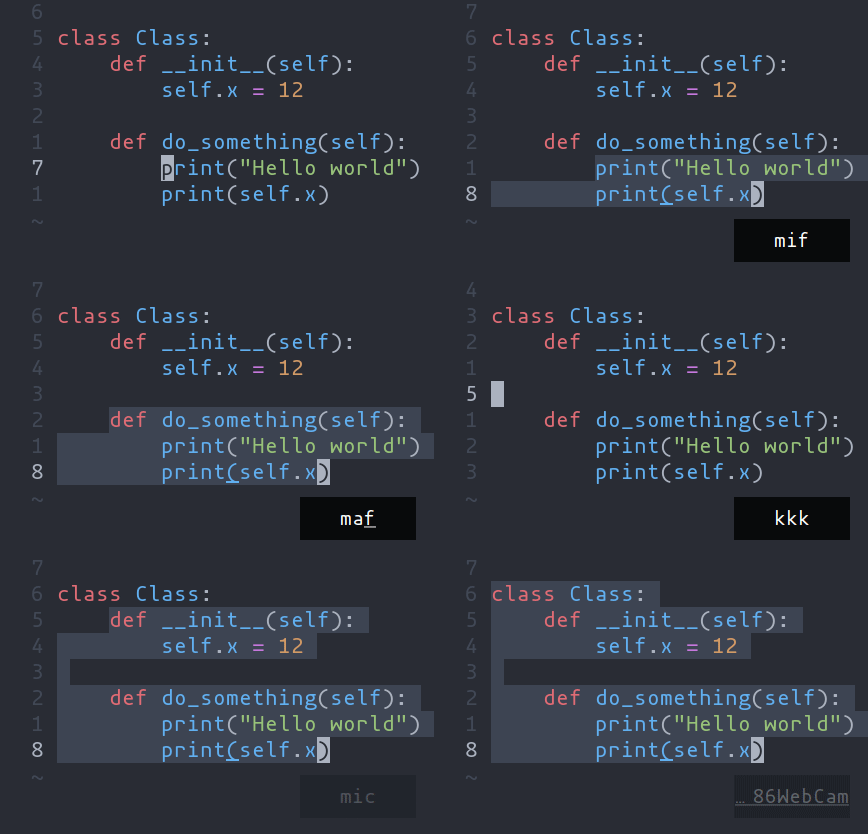
- `ma` - Select around the object (`va` in Vim, `<alt-a>` in Kakoune)
- `mi` - Select inside the object (`vi` in Vim, `<alt-i>` in Kakoune)
| Key after `mi` or `ma` | Textobject selected |
| --- | --- |
| `w` | Word |
| `W` | WORD |
| `p` | Paragraph |
| `(`, `[`, `'`, etc. | Specified surround pairs |
| `m` | The closest surround pair |
| `f` | Function |
| `t` | Type (or Class) |
| `a` | Argument/parameter |
| `c` | Comment |
| `T` | Test |
| `g` | Change |
> 💡 `f`, `t`, etc. need a tree-sitter grammar active for the current
document and a special tree-sitter query file to work properly. [Only
some grammars](./lang-support.md) currently have the query file implemented.
Contributions are welcome!
## Navigating using tree-sitter textobjects
Navigating between functions, classes, parameters, and other elements is
possible using tree-sitter and textobject queries. For
example to move to the next function use `]f`, to move to previous
type use `[t`, and so on.

For the full reference see the [unimpaired](./keymap.html#unimpaired) section of the key bind
documentation.
> 💡 This feature relies on tree-sitter textobjects
> and requires the corresponding query file to work properly.