(Currently not fully documented, see the keymappings list for more.)
See tutor.txt (accessible via hx --tutor or :tutor) for a vimtutor-like introduction.
Vim-like registers can be used to yank and store text to be pasted later. Usage is similar, with " being used to select a register:
"ay - Yank the current selection to register a."op - Paste the text in register o after the selection.
If there is a selected register before invoking a change or delete command, the selection will be stored in the register and the action will be carried out:
"hc - Store the selection in register h and then change it (delete and enter insert mode)."md - Store the selection in register m and delete it.
| Register character |
Contains |
/ |
Last search |
: |
Last executed command |
" |
Last yanked text |
_ |
Black hole |
There is no special register for copying to system clipboard, instead special commands and keybindings are provided. See the keymap for the specifics.
The black hole register works as a no-op register, meaning no data will be written to / read from it.
Functionality similar to vim-surround is built into
helix. The keymappings have been inspired from vim-sandwich:
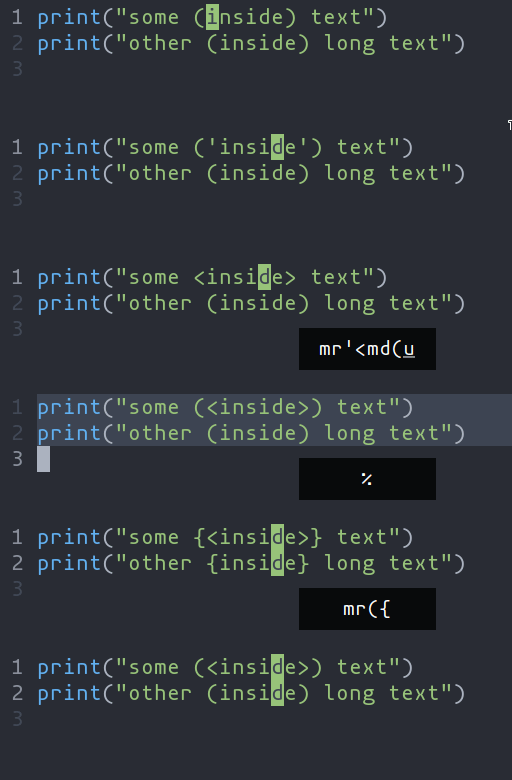
ms - Add surround charactersmr - Replace surround charactersmd - Delete surround characters
ms acts on a selection, so select the text first and use ms<char>. mr and md work
on the closest pairs found and selections are not required; use counts to act in outer pairs.
It can also act on multiple selections (yay!). For example, to change every occurrence of (use) to [use]:
% to select the whole files to split the selections on a search term- Input
use and hit Enter
mr([ to replace the parens with square brackets
Multiple characters are currently not supported, but planned.
A-p, A-o, A-i, and A-n (or Alt and arrow keys) move the primary
selection according to the selection's place in the syntax tree. Let's walk
through an example to get familiar with them. Many languages have a syntax like
so for function calls:
A function call might be parsed by tree-sitter into a tree like the following.
(call
  function: (identifier) ; func
  arguments:
    (arguments           ; (arg1, arg2, arg3)
      (identifier)       ; arg1
      (identifier)       ; arg2
      (identifier)))     ; arg3
Use :tree-sitter-subtree to view the syntax tree of the primary selection. In
a more intuitive tree format:
            ┌────┐
            │call│
      ┌─────┴────┴─────┐
      │                │
┌─────▼────┐      ┌────▼────┐
│identifier│      │arguments│
│  "func"  │ ┌────┴───┬─────┴───┐
└──────────┘ │        │         │
             │        │         │
   ┌─────────▼┐  ┌────▼─────┐  ┌▼─────────┐
   │identifier│  │identifier│  │identifier│
   │  "arg1"  │  │  "arg2"  │  │  "arg3"  │
   └──────────┘  └──────────┘  └──────────┘
Say we have a selection that wraps arg1. The selection is on the arg1 leaf
in the tree above.
Using A-n would select the next sibling in the syntax tree: arg2.
While A-o would expand the selection to the parent node. In the tree above we
can see that we would select the arguments node.
There is also some nuanced behavior that prevents you from getting stuck on a
node with no sibling. If we have a selection on arg1, A-p would bring us
to the previous child node. Since arg1 doesn't have a sibling to its left,
though, we climb the syntax tree and then take the previous selection. So A-p
will move the selection over to the "func" identifier.
Currently supported: word, surround, function, class, parameter.

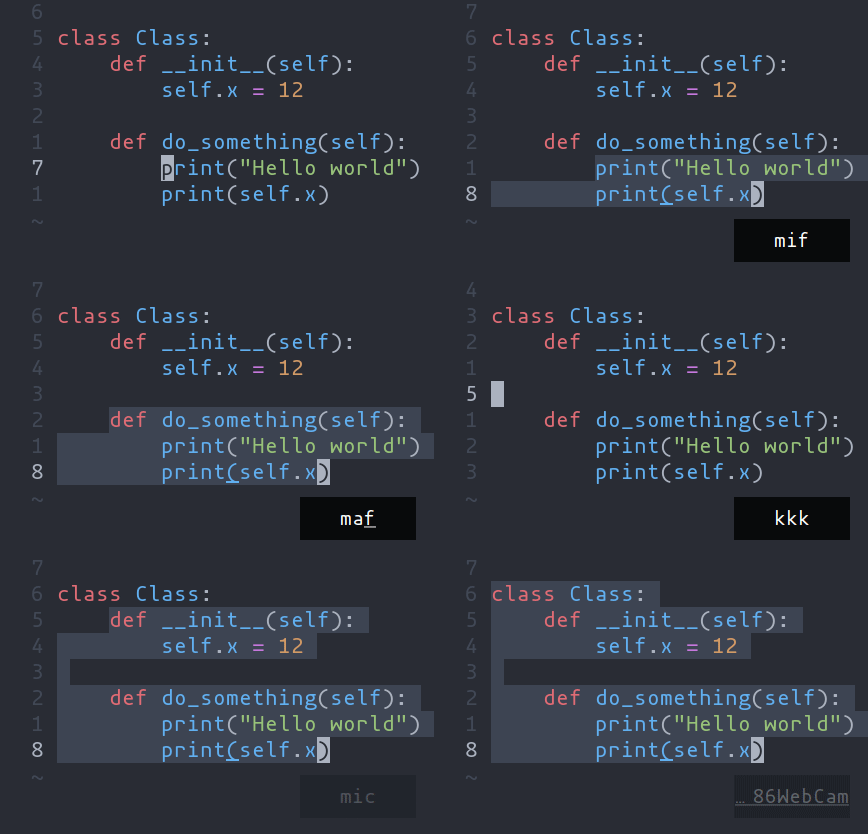
ma - Select around the object (va in vim, <alt-a> in kakoune)mi - Select inside the object (vi in vim, <alt-i> in kakoune)
Key after mi or ma |
Textobject selected |
w |
Word |
W |
WORD |
(, [, ', etc |
Specified surround pairs |
m |
Closest surround pair |
f |
Function |
c |
Class |
a |
Argument/parameter |
o |
Comment |
NOTE: f, c, etc need a tree-sitter grammar active for the current
document and a special tree-sitter query file to work properly. Only
some grammars currently have the query file implemented.
Contributions are welcome!
Navigating between functions, classes, parameters, etc is made
possible by leveraging tree-sitter and textobjects queries. For
example to move to the next function use ]f, to move to previous
class use [c, and so on.

See the unimpaired section of the keybind
documentation for the full reference.
NOTE: This feature is dependent on tree-sitter based textobjects
and therefore requires the corresponding query file to work properly.