1 2 3 4 5 6 7 8 9 10 11 12 13 14 15 16 17 18 19 20 21 22 23 24 25 26 27 28 29 30 31 32 33 34 35 36 37 38 39 40 41 42 43 44 45 46 47 48 49 50 51 52 53 54 55 56 57 58 59 60 61 62 63 64 65 66 67 68 69 70 71 72 73 74 75 76 77 78 79 80 81 82 83 84 85 86 87 88 89 90 91 92 93 94 95 96 97 98 99 100 101 102 103 104 105 106 107 108 109 110 111 112 113 114 115 116 117 118 119 120 121 122 123 124 125 126 127 128 129 130 131 132 133 134 135 136 137 138 139 140 141 142 143 144 145 146 147 148 149 150 151 152 153 154 155 156 157 158 159 160 161 162 163 164 165 166 167 168 169 170 171 172 173 174 175 176 177 178 179 180 181 182 183 184 185 186 187 188 189 190 191 192 |
Using Helix
For a full interactive introduction to Helix, refer to the
tutor which
can be accessed via the command
RegistersIn Helix, registers are storage locations for text and other data, such as the
result of a search. Registers can be used to cut, copy, and paste text, similar
to the clipboard in other text editors. Usage is similar to Vim, with User-defined registersHelix allows you to create your own named registers for storing text, for example:
If a register is selected before invoking a change or delete command, the selection will be stored in the register and the action will be carried out:
Special registers
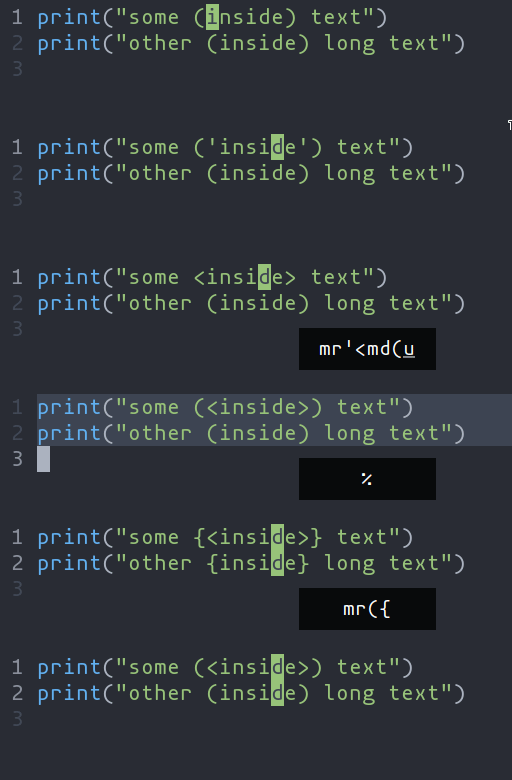
The system clipboard is not directly supported by a special register. Instead, special commands and keybindings are provided. Refer to the key map for more details. The black hole register is a no-op register, meaning that no data will be read or written to it. SurroundHelix includes built-in functionality similar to vim-surround. The keymappings have been inspired from vim-sandwich:
You can use counts to act on outer pairs. Surround can also act on multiple selections. For example, to change every occurrence of
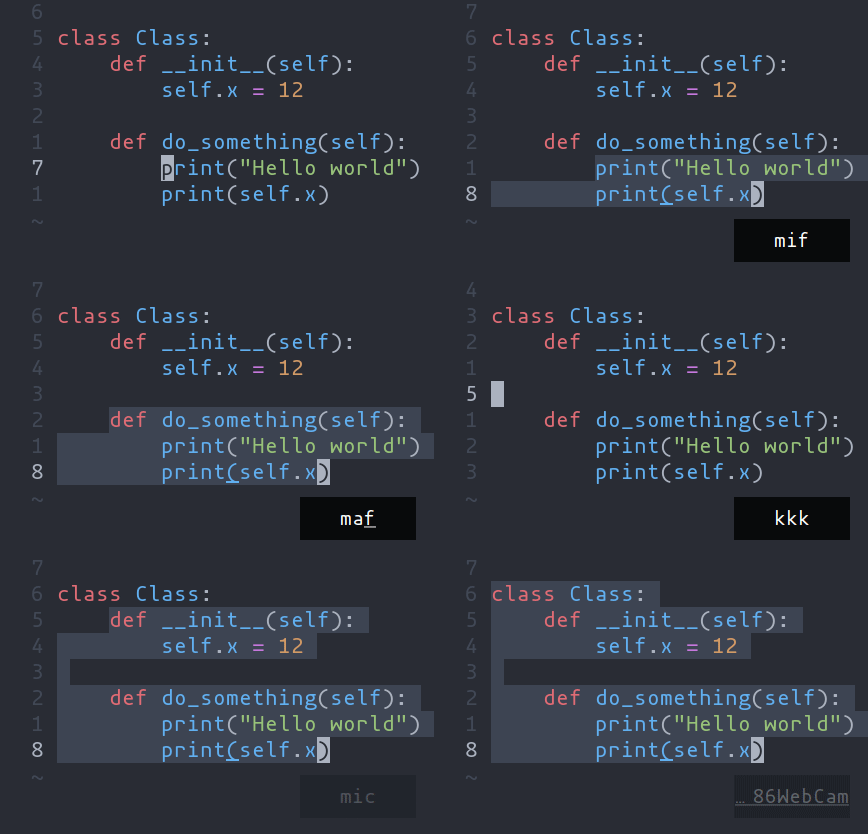
Multiple characters are currently not supported, but planned for future release. Selecting and manipulating text with textobjectsIn Helix, textobjects are a way to select, manipulate and operate on a piece of text in a structured way. They allow you to refer to blocks of text based on their structure or purpose, such as a word, sentence, paragraph, or even a function or block of code.
Navigating using tree-sitter textobjectsNavigating between functions, classes, parameters, and other elements is
possible using tree-sitter and textobject queries. For
example to move to the next function use
For the full reference see the unimpaired section of the key bind documentation.
Moving the selection with syntax-aware motions
A function call might be parsed by tree-sitter into a tree like the following. Use If you have a selection that wraps Similarly, There is also some nuanced behavior that prevents you from getting stuck on a
node with no sibling. When using |