Unnamed repository; edit this file 'description' to name the repository.
Diffstat (limited to 'book/src/usage.md')
| -rw-r--r-- | book/src/usage.md | 199 |
1 files changed, 0 insertions, 199 deletions
diff --git a/book/src/usage.md b/book/src/usage.md index e0148219..859cb670 100644 --- a/book/src/usage.md +++ b/book/src/usage.md @@ -1,15 +1,5 @@ # Using Helix -<!--toc:start--> -- [Registers](#registers) - - [User-defined registers](#user-defined-registers) - - [Special registers](#special-registers) -- [Surround](#surround) -- [Selecting and manipulating text with textobjects](#selecting-and-manipulating-text-with-textobjects) -- [Navigating using tree-sitter textobjects](#navigating-using-tree-sitter-textobjects) -- [Moving the selection with syntax-aware motions](#moving-the-selection-with-syntax-aware-motions) -<!--toc:end--> - For a full interactive introduction to Helix, refer to the [tutor](https://github.com/helix-editor/helix/blob/master/runtime/tutor) which can be accessed via the command `hx --tutor` or `:tutor`. @@ -17,192 +7,3 @@ can be accessed via the command `hx --tutor` or `:tutor`. > 💡 Currently, not all functionality is fully documented, please refer to the > [key mappings](./keymap.md) list. -## Registers - -In Helix, registers are storage locations for text and other data, such as the -result of a search. Registers can be used to cut, copy, and paste text, similar -to the clipboard in other text editors. Usage is similar to Vim, with `"` being -used to select a register. - -### User-defined registers - -Helix allows you to create your own named registers for storing text, for -example: - -- `"ay` - Yank the current selection to register `a`. -- `"op` - Paste the text in register `o` after the selection. - -If a register is selected before invoking a change or delete command, the selection will be stored in the register and the action will be carried out: - -- `"hc` - Store the selection in register `h` and then change it (delete and enter insert mode). -- `"md` - Store the selection in register `m` and delete it. - -### Default registers - -Commands that use registers, like yank (`y`), use a default register if none is specified. -These registers are used as defaults: - -| Register character | Contains | -| --- | --- | -| `/` | Last search | -| `:` | Last executed command | -| `"` | Last yanked text | -| `@` | Last recorded macro | - -### Special registers - -Some registers have special behavior when read from and written to. - -| Register character | When read | When written | -| --- | --- | --- | -| `_` | No values are returned | All values are discarded | -| `#` | Selection indices (first selection is `1`, second is `2`, etc.) | This register is not writable | -| `.` | Contents of the current selections | This register is not writable | -| `%` | Name of the current file | This register is not writable | -| `+` | Reads from the system clipboard | Joins and yanks to the system clipboard | -| `*` | Reads from the primary clipboard | Joins and yanks to the primary clipboard | - -When yanking multiple selections to the clipboard registers, the selections -are joined with newlines. Pasting from these registers will paste multiple -selections if the clipboard was last yanked to by the Helix session. Otherwise -the clipboard contents are pasted as one selection. - -## Surround - -Helix includes built-in functionality similar to [vim-surround](https://github.com/tpope/vim-surround). -The keymappings have been inspired from [vim-sandwich](https://github.com/machakann/vim-sandwich): - -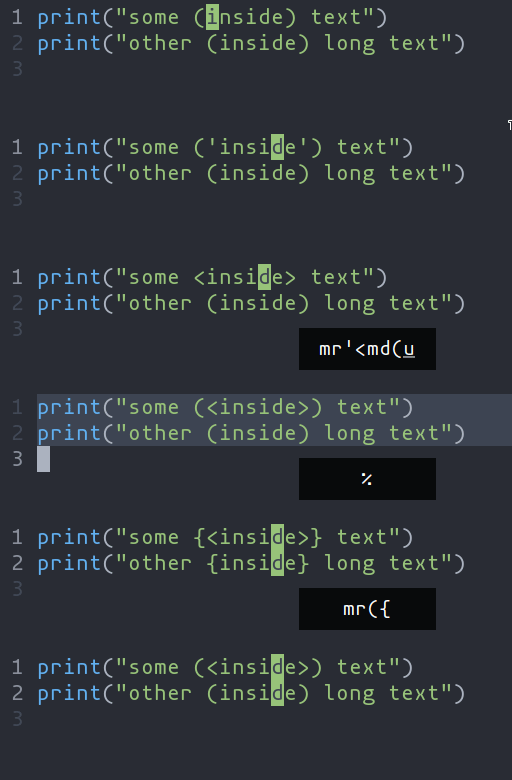 - -| Key Sequence | Action | -| --------------------------------- | --------------------------------------- | -| `ms<char>` (after selecting text) | Add surround characters to selection | -| `mr<char_to_replace><new_char>` | Replace the closest surround characters | -| `md<char_to_delete>` | Delete the closest surround characters | - -You can use counts to act on outer pairs. - -Surround can also act on multiple selections. For example, to change every occurrence of `(use)` to `[use]`: - -1. `%` to select the whole file -2. `s` to split the selections on a search term -3. Input `use` and hit Enter -4. `mr([` to replace the parentheses with square brackets - -Multiple characters are currently not supported, but planned for future release. - -## Selecting and manipulating text with textobjects - -In Helix, textobjects are a way to select, manipulate and operate on a piece of -text in a structured way. They allow you to refer to blocks of text based on -their structure or purpose, such as a word, sentence, paragraph, or even a -function or block of code. - - -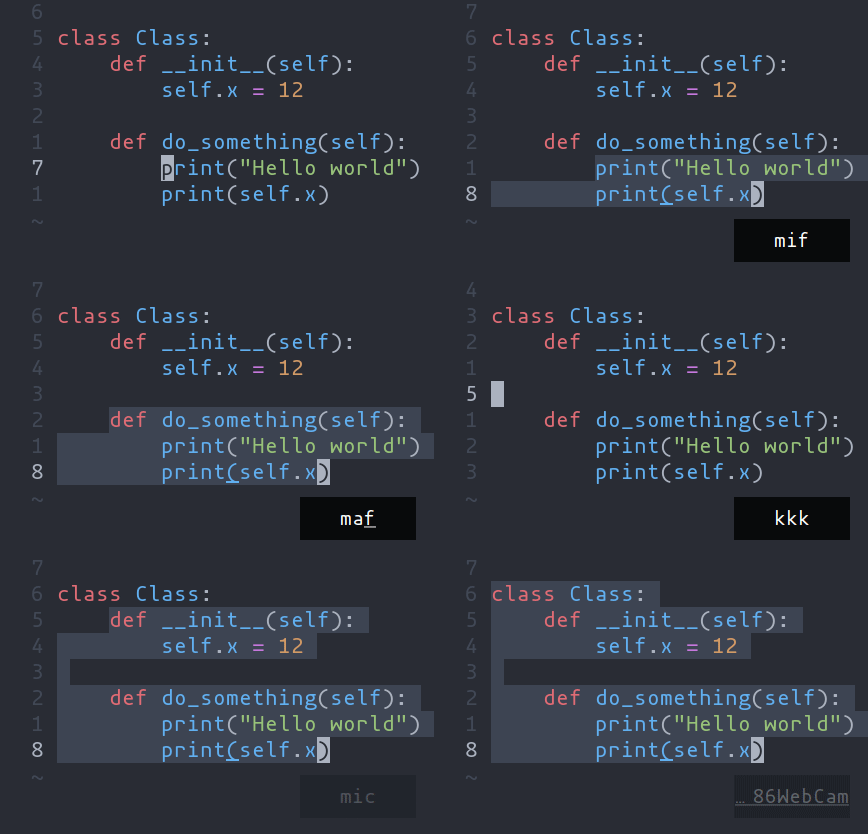 - -- `ma` - Select around the object (`va` in Vim, `<alt-a>` in Kakoune) -- `mi` - Select inside the object (`vi` in Vim, `<alt-i>` in Kakoune) - -| Key after `mi` or `ma` | Textobject selected | -| --- | --- | -| `w` | Word | -| `W` | WORD | -| `p` | Paragraph | -| `(`, `[`, `'`, etc. | Specified surround pairs | -| `m` | The closest surround pair | -| `f` | Function | -| `t` | Type (or Class) | -| `a` | Argument/parameter | -| `c` | Comment | -| `T` | Test | -| `g` | Change | - -> 💡 `f`, `t`, etc. need a tree-sitter grammar active for the current -document and a special tree-sitter query file to work properly. [Only -some grammars][lang-support] currently have the query file implemented. -Contributions are welcome! - -## Navigating using tree-sitter textobjects - -Navigating between functions, classes, parameters, and other elements is -possible using tree-sitter and textobject queries. For -example to move to the next function use `]f`, to move to previous -type use `[t`, and so on. - -![Tree-sitter-nav-demo][tree-sitter-nav-demo] - -For the full reference see the [unimpaired][unimpaired-keybinds] section of the key bind -documentation. - -> 💡 This feature relies on tree-sitter textobjects -> and requires the corresponding query file to work properly. - -## Moving the selection with syntax-aware motions - -`Alt-p`, `Alt-o`, `Alt-i`, and `Alt-n` (or `Alt` and arrow keys) allow you to move the -selection according to its location in the syntax tree. For example, many languages have the -following syntax for function calls: - -```js -func(arg1, arg2, arg3); -``` - -A function call might be parsed by tree-sitter into a tree like the following. - -```tsq -(call - function: (identifier) ; func - arguments: - (arguments ; (arg1, arg2, arg3) - (identifier) ; arg1 - (identifier) ; arg2 - (identifier))) ; arg3 -``` - -Use `:tree-sitter-subtree` to view the syntax tree of the primary selection. In -a more intuitive tree format: - -``` - ┌────┐ - │call│ - ┌─────┴────┴─────┐ - │ │ -┌─────▼────┐ ┌────▼────┐ -│identifier│ │arguments│ -│ "func" │ ┌────┴───┬─────┴───┐ -└──────────┘ │ │ │ - │ │ │ - ┌─────────▼┐ ┌────▼─────┐ ┌▼─────────┐ - │identifier│ │identifier│ │identifier│ - │ "arg1" │ │ "arg2" │ │ "arg3" │ - └──────────┘ └──────────┘ └──────────┘ -``` - -If you have a selection that wraps `arg1` (see the tree above), and you use -`Alt-n`, it will select the next sibling in the syntax tree: `arg2`. - -```js -// before -func([arg1], arg2, arg3) -// after -func(arg1, [arg2], arg3); -``` - -Similarly, `Alt-o` will expand the selection to the parent node, in this case, the -arguments node. - -```js -func[(arg1, arg2, arg3)]; -``` - -There is also some nuanced behavior that prevents you from getting stuck on a -node with no sibling. When using `Alt-p` with a selection on `arg1`, the previous -child node will be selected. In the event that `arg1` does not have a previous -sibling, the selection will move up the syntax tree and select the previous -element. As a result, using `Alt-p` with a selection on `arg1` will move the -selection to the "func" `identifier`. - -[lang-support]: ./lang-support.md -[unimpaired-keybinds]: ./keymap.md#unimpaired -[tree-sitter-nav-demo]: https://user-images.githubusercontent.com/23398472/152332550-7dfff043-36a2-4aec-b8f2-77c13eb56d6f.gif |