mindustry logic execution, map- and schematic- parsing and rendering
Diffstat (limited to 'README.md')
| -rw-r--r-- | README.md | 46 |
1 files changed, 13 insertions, 33 deletions
@@ -1,37 +1,17 @@ -# Plandustry -Plandustry is a command-line tool for editing [Mindustry](https://github.com/Anuken/Mindustry) schematics. +# mindus +Mindus is a library for working with [Mindustry](https://github.com/Anuken/Mindustry) formats. -## Command-Line usage -The program must be run with a command line first determining the operation to perform, followed by arguments that depend on the operation. -In general, arguments can either be literal (not starting with a dash) short form (starting with a single dash) and long form (starting with a double dash). In -all cases, arguments are space-delimited or can be wrapped in quotes (but internal quotes are considered literal). Both short and long form arguments may be -passed a value, but differ in their syntax and interpretation. Short form arguments are only a single character long, but multiple (even duplicates) can -be used in the same group (following a single dash). This has the advantage that the value following it is passed to all arguments. For example: -- `-a -b -c=value` is 2 arguments with no value (`a` and `b`) and another argument (`c`) with value `value` -- `-ab -xyx` is 5 arguments with no value: `a`, `b`, 2 times `x` and `z` -- `-hello=world` is 5 arguments: `h`, `e`, 2 times `l` and `o`, each (even the double `l`) with the value `world` -Long form arguments are simpler: they start with a double dash and may be arbitrarily long. The syntax for passing values is the same but there can only be one -argument per token, and the value only applies to it (such as `--long-form-arg=its-value`). -Note that arguments can forbid, require or permit the inclusion of a value, and some may be used multiple times (as noted below). +## Usage -### Print -The print command takes in schematics from the command line, from files or interactively and prints the name, tags, build cost and blocks contained in it. +```rs +use mindus::*; +let reg = build_registry(); +let mut ss = SchematicSerializer(®); +let s = ss.deserialize_base64("bXNjaAF4nD3SQW6DMBBA0bE94wF104vkDr1H1QVtWUQioTL0/oFJ/Fl9GXiy5ZFBhiJ6n26zvE9tv7T1f5/bZbtNyyJvv/P2065/+3W9i0hdpu952SR/fiWp29qOL4/lDzkfExkiEpWPGqMKpZRRlT/8VQkv4aXwnlUopYw6vRTVvRzeGJVYy1ShlDKqezk8O8+DV/AKXgkvRSllvK2sdU/xFE/xFE/xFE/xNLzxeRlU9wzPOK9xXsMzPMOr3EcNL0VlqlBKGVWpfh+O5+zPmRdnXpx5cebFmRd/eQ9KIReL")?; +let output = Renderer::render(&s); +output.save("output.png"); +``` -| Argument | Description | Appears | Value | -| --- | --- | --- | --- | -| `literal` | A base-64 encoded Schematic to print | Optional, Repeatable | N/A | -| `-f`, `--file` | A path to a `.msch` file (binary schematic) to print | Optional, Repeatable | Required | -| `-i`, `--interactive` | Run interactively where base-64 encoded schematics are read from stdin and printed | Optional | Forbidden | +This produces: -Note that interactive mode is the default if no literals or files are given, but to include it anyway is not an error. - -### Edit -The edit command is an interactive prompt capable of loading, editing, printing and saving schematics. - -| Argument | Description | Appears | Value | -| --- | --- | --- | --- | -| `literal` | A base-64 encoded Schematic to load | Optional | N/A | -| `-f`, `--file` | A path to a `.msch` file (binary schematic) to load | Optional | Required | - -If the file argument is present, literals are ignored. After loading the given schematic (if any), the program enters interactive mode. Use "help" for a list -of available commands in interactive mode. +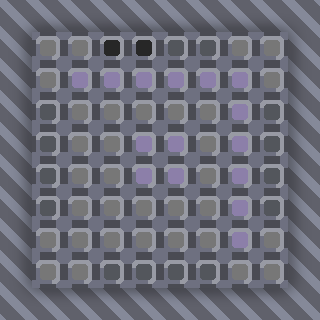
\ No newline at end of file |